TL;DR — QUICK PICKS BY USE CASE
Are you tired of spending too much time on manual work in digital marketing? When it comes to analyzing or managing your routine, you can’t excel in your career without digital marketing tools. All marketers know the importance of various tools, services, and software that can help them easily carry out their everyday tasks. From planning the content to revenue analysis, these tools will enhance significantly a marketer’s productivity.
Changes in marketing techniques in the digital marketplace have forever changed the way entrepreneurs run their businesses. With the opportunity to get a much bigger number of clients than ever before, companies can reach and engage with their customers much faster through their websites. Nowadays digital marketing is a major investment for any type of business, big or small, and that capital doesn’t always cost money. To be sure that you use your time as efficiently as possible, I will show you 25 free essential digital marketing tools that you need to integrate into your daily marketing routine.
To make it more comfortable for you, I have put these must-have tools in some groups. Let’s get started:
- Website Tools
- Analytics & Reporting Tools
- SEO / SEM Tools
- Social Media Tools
- Email Marketing & Blogging Tools
- Design Tools
PRNEWS.IO
PRNEWS.IO is a marketplace: choose a specific outlet from a catalog of 105,000+ media sites across 175 countries and 77 languages, pay the listed price, and get a guaranteed placement — refunded if the outlet declines the content. Every other tool on this list helps you build, measure, or optimize a marketing asset; PRNEWS.IO is the one that gets it in front of an audience beyond your own channels, on a real, indexed publication rather than depending on organic reach alone.
Best for: getting guaranteed press coverage for a launch, milestone, or piece of content, without pitching or waiting on a journalist’s schedule.
Medialister
Medialister runs on the same publisher network as PRNEWS.IO, with a shared campaign board and outlets filterable by real Similarweb, Ahrefs, and Semrush metrics — useful for a marketing team running placements across several markets or clients and needing shared visibility into what’s live, pending, or declined.
Best for: coordinating an ongoing placement program across multiple markets rather than a single one-off order.
GT Metrix
GT Metrix reviews and scores speed for both desktop and mobile website versions. GT Metrix was created to help users with different skill levels monitor and speed up their website performance. E.g. the average mobile page takes 15 seconds to load, and you can lose around 70% of your website visitors in that time. So the site speed is crucial.
The overall interface is incredibly easy to use. Its UX design is easy to navigate and elicits trust. This tester is incredibly straightforward. You just put your URL in and hit “Analyze.” GT Metrix boasts over 350,000 registered users, and it’s worked with more than 350 million web pages. It’s your reliable partner in improving web performance and remedying its problems.
Best for: a detailed, easy-to-read speed diagnosis for both desktop and mobile.
Google PageSpeed Insights
Google PageSpeed Insights is similar to GT Metrix. It shows you both mobile and desktop page speeds with really helpful analytics features and recommendations on how to speed up.
This tool is also very easy to use. Just type your website URL in, wait for a few seconds, and you’ll get results from both mobile and desktop versions of your website. The UI design was well thought out, so it’s easy to understand whether your website is performing well or not, and what you need to change.
Best for: speed recommendations tied directly to the metrics Google itself uses for ranking.
Google Analytics
Google Analytics is probably the most powerful software freely available for every marketer. All you need is to add a Google Analytics code to your website and get access to the priceless insights of your website. You can set up goals and create conversion tracking to receive the most of your analytics information and use it to improve your website’s content, user experience, and optimization for bigger profits.
Best for: the non-negotiable analytics baseline every site should have running before adding anything else.
Google Data Studio
Google Data Studio is another useful free Google service. This tool allows you to include many different data sources into one report. You can easily import web and business data from different popular data sources and lets you create meaningful interactive dashboards. With help of this service, you can create complicated reports within minutes without analyzing long tables manually.
Data Studio has an intuitive design that is very easy to use. You can add charts, tables and create reports on the fly. You can also analyze web and business data from different popular data sources there. The best part is that using it doesn’t require any deep technical skills.
Best for: building client-ready or stakeholder-ready dashboards from multiple data sources without manual table-building.
UTM Tracking Code Builder
UTM Tracking Code Builder allows you to add tags to your link to accurately track in Google Analytics the source of your traffic. It has a very intuitive and minimalist interface. It’s very easy to understand how the builder works and it has a good explanation of which line and tag you need to use, it’s just a matter of seconds.
Best for: making sure every campaign link is actually attributable once it starts driving traffic.
Woopra
Woopra is an analytics platform that’s specifically tailored for e-commerce businesses. Woopra analyzes each step of your site’s checkout process to determine where your users are leaving and which traffic source is the most valuable in terms of checkout success.
Best for: diagnosing checkout drop-off and attributing which channels drive actual e-commerce conversions.
Nightwatch
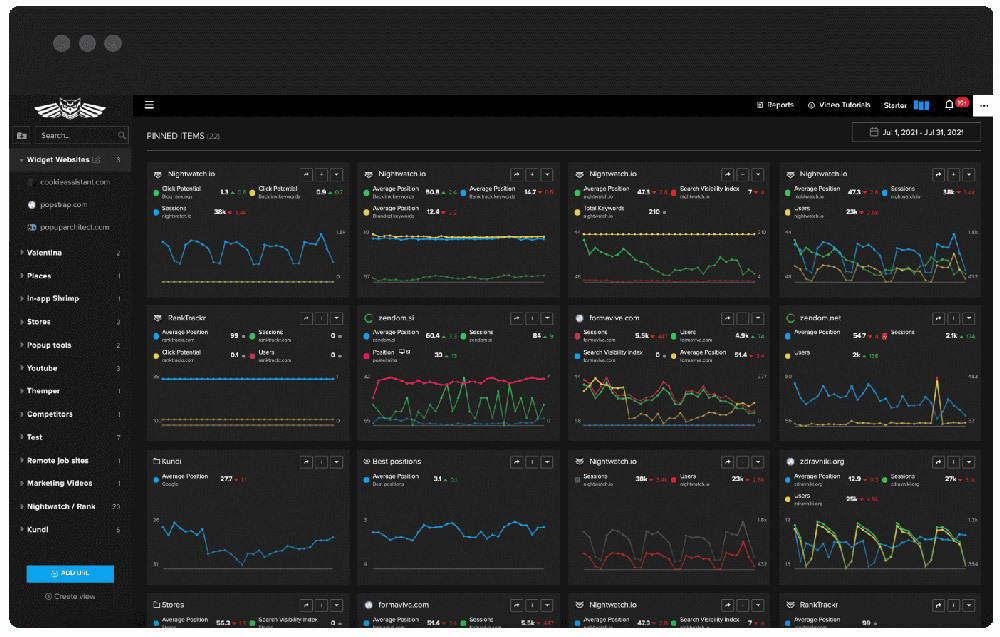
This cost-effective rank tracker allows you to customize and configure pretty much everything you see.
Daily updated rankings allow you additional insight into ever-changing SERPs due to algorithmic changes and keyword cannibalization. It also offers powerful keyword grouping to quickly notice which parts of the website are underperforming. Nightwatch lets you track 5 competitors free of charge.
You can integrate data from Google Search Console and Google Analytics and put it in the columns beside the organic position. You can also create customizable graphs with all the integrated data.The tool calculates the Click potential metric, so you can quickly see how much traffic you should be
getting. It also has stakeholders, clients, or SEO managers in mind who can be impressed with white-label customizable reports. They are easy to create with drag and drop builder.
It allows you to track 107,296 locations worldwide. Data is precise because Nightwatch can access many Google data centers around the globe.
Best for: agencies and SEO managers who need granular local rank tracking and client-ready reporting in one tool.
Yoast
Yoast is an SEO plugin that has rich functionality. This SEO plugin helps you easily optimize a website to perform better in search results. It helps blogs in the areas, where WordPress cannot help much. It includes, for example, submitting sitemaps, managing keywords, creating content, using webmaster tools, etc.
Yoast plugin has built-in meta keywords and description management, XML sitemaps, social features, content analysis, rich snippets, and many more features. It can install general canonicals, open graph tags. Also, it allows you to bulk edit title and meta tags from the front-end and offers on-page optimization insights.
Best for: on-page SEO management for any WordPress site without touching code.
MozBar
MozBar is a free software add-on from Moz that showcases metrics for you right in your toolbar. MozBar shows its famous features, as a Domain Authority and Page Authority, as well as a set of other search metrics and insights.
Its UI is intuitive, the information is easy to receive, and it’s convenient to use all info MozBar provides. So, MozBar is your helpful friend in showcasing to you what your competition’s keyword strategy is and what their strategy misses.
Best for: quick competitive metric lookups without leaving the page you’re already on.
Google Search Console
Google Search Console remains one of the most powerful and multifunctional SEO tools on the web. There are some great keyword tracking tools. It’s great for discovering why people are coming to your website. You can use this information to improve the content you have and attract more traffic, increasing conversions. This service is also great for finding and analyzing potential blocks that might be preventing Google from crawling your site as effectively.
Best for: diagnosing why organic traffic looks the way it does and fixing crawlability issues at the source.
Google Trends
Google Trends is an online search service where you can see how often specific keywords, phrases, and subjects have been questioned over a specific period. It’s a great tool to track down seasonal trends. It will allow you to check keywords and the previous statistics for a keyword. There is also one useful feature – a keyword comparison for different periods and within a certain area. The data is pretty accurate and it’s not limited to google searches, but also includes youtube and image searches.
Best for: validating whether a topic or seasonal campaign timing actually has search interest behind it.
Answer the Public
Answer the Public is a tool for discovering what people are searching for in Google. It is a free service that helps you with keyword research and ideas for your future posts. It shows a visualization of data and uses searches from Bing and Google. Having built up a database from millions of searches it can predict what you’re going to ask next, based on the information that’s already been entered.
Best for: generating content ideas grounded in actual phrasing people search, not guessed keywords.
Screaming Frog
Screaming Frog is a spider tool that can quickly crawl websites, lists of websites, or specific web pages to give you a complete analysis of their performance. It will help you reveal broken links, broken pages, bad redirects if you have any. Troubleshooting most of these errors is a quick win for search marketers.
Best for: a full technical audit that catches structural problems before they cost rankings.
People turn to social to learn more about the companies, what they do daily, and how their products and services differ from competitors. Social media is a major element of any comprehensive marketing strategy. That’s why social media management marketing tools have become the core in marketing instruments both big and small.
Linktr.ee
Linktree generates a single link for a social bio — most commonly Instagram — that then fans out to multiple destinations, solving the “one link” limitation most social platforms impose. It’s most useful for accounts that don’t need to swap their bio link multiple times a day.
Best for: consolidating several destinations behind one bio link on platforms that only allow one.
Buffer
Buffer is a web app a complete social media management service that allows you to schedule and publish your posts from its platform. We’re not just talking about one or two social networks, because Buffer lets you include all your accounts into one easy-to-manage dashboard. Buffer Publish contains Instagram, Facebook, Twitter, LinkedIn, and Pinterest. It can also feature an Instagram Shop Grid feature for e-commerce integration and allows managers to create and manage draft posts. As for reports and analytics, Buffer Publish subscribers have access to their history of posts as well as the full history of the overview report.
Best for: managing publishing across several social platforms from a single, unified calendar.
Canva
Canva is indispensable when it comes to free design tools. Canva allows users with all levels to create social media graphics, presentations, posters, and other visual content. This service provides you with more than a million photos, graphics, and typography so you can design professional layouts and stunning visuals. You can start with a template or a completely blank page, and create whatever design you want.
By the way, you may use Instagram photoshop actions as a marketing tool too.
Best for: producing professional-looking visual content without formal design training.
Plann
Plann is more than just a scheduling tool – it’s a complete social media management service that helps you create, curate, and optimize your content for maximum engagement. With features like a content calendar, drag-and-drop post scheduling, and analytics reports, you can stay on top of your social media game and grow your audience like never before.
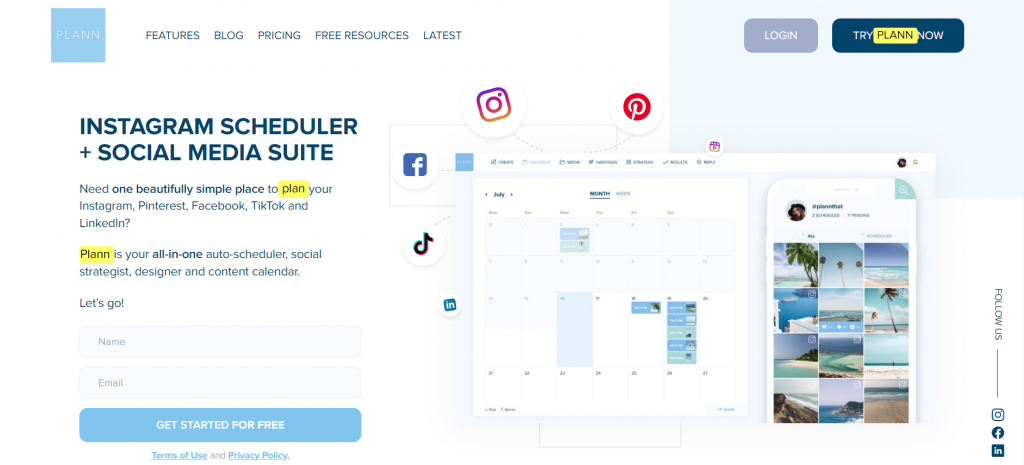
Best for: teams that want content planning and performance analytics integrated with scheduling, not just a posting queue.
Mailchimp
Mailchimp a web-based email marketing service. It is a great tool for most English-speaking users with its easy-to-use range of features. Its templates help you create email newsletters, share them on social networks, integrate with services you already use, and control your results. It’s easy to get started on the platform. The dashboard highlights the steps very clearly: Start designing your first email, add your contacts, and send your first email.
Whether you’re an email marketing strategy expert or a beginner, there are many functions and opportunities you can do with MailChimp.
Best for: teams at any experience level who want a single platform that scales from a first newsletter to a mature email program.
Coschedule Email Subject Line Analyzer
Coschedule Email Subject Line Analyzer allows you to check your subject lines and scores each based on a set of metrics to help you choose the best one. It gives you an overall score for your subject line, you can see where and why you lost points. It also gives you helpful tips on how to correct your subject text.
Coschedule is a powerful tool for any marketing professional or business order. Also, to analyzing your email subject, you can create a marketing and blog calendar there.
Best for: testing and improving headlines or subject lines before anything goes out, backed by specific word-level suggestions.
Headline Analyzer Tool
Headline Analyzer Tool allows you to test your headlines and scores each to help you pick the best one. Just like the tool above, it can suggest clear action items on how to make your headline more powerful. The headline analyzer provides several marks for readability, SEO, and sentiments. It determines the words that don’t help convey much meaning and recommends which words to change. You can also see suggestions for boosting SEO in your headlines.
Ubersuggest
Ubersuggest is a free-with-limits keyword and SEO research tool from Neil Patel’s team, covering keyword suggestions, competitive domain analysis, and backlink data in a simpler interface than an enterprise SEO suite — a reasonable stand-in for a marketer who needs directional keyword data without an Ahrefs- or Semrush-level budget.
Best for: budget-conscious keyword and competitor research without a full enterprise SEO subscription.
CuttLy
CuttLy is an easy-to-use link shortener. Links can get irritating and the last thing you need for your business is to connect your well-crafted brand image or post alongside a 230-character URL. Converting long referral URLs into short easy to read URLs is important and useful for every marketer.
Best for: clean, trackable links anywhere a raw URL would look sloppy or be too long to use.
FreeIcons
FreeIcons is a free database of icon graphics. It’s easy to use, has a good intuitive user interface, and provides a huge library of icons and icon-packs. This service includes icons in many styles, flat, color, black, line, etc…
Best for: fast, free icon sourcing across a range of visual styles.
Undraw
Undraw provides royalty-free visuals, illustrations for social media and blogging use. Extremely useful for a simple website where you just need a picture to get a point across. And what makes unDraw so helpful is that you can download copyright-free SVG files. After downloading SVG files, you can edit, customize, and put together multiple images for a custom design. You can also color manage the illustrations straight on the website.
Best for: editable, on-brand illustration rather than generic stock photography.
All the Free Stock
All the Free Stock is a library of all free stock images so you can search in one place. Thanks to talented photographers, there are thousands of stunning free stock photos for you to use in your online projects. All the visuals on these sites are free to use for personal, or commercial purposes.
Best for: a single search across multiple free stock photo sources instead of checking each one individually.
Youtube Music
Youtube Music is a piece of royalty-free stock music or free stock audio for any digital project with a large number of categories. That’s right, it’s an enormous list of free music for YouTube, by YouTube, on YouTube. You can specify your search by using either the search function or the filters. If you know exactly what you are looking for, the filters will work for you. It is grouping the music into Genre, Mood, Instrument, Duration, and Attribution.
Best for: royalty-free background music and sound effects for video content, filtered by mood or genre.
FileZigZag
FileZigZag is a free online document converter tool that can transform most common documents, spreadsheets, and other similar formats. You’d like how user-friendly is FileZigZag, and also, it can convert large document files. This converting service can be used from any web browser on any operating system.
Best for: quick, browser-based file format conversion without installing dedicated software.
HubSpot Make My Persona
“Make My Persona” tool designed to help you with the persona building and visualization process. It offers to create a buyer persona profile that your marketing team and the entire company can use to market, sell, and provide better service The site then automatically directs you through a series of questions that identifies the basics of your persona. Instead of having to choose and sort what kind of information you need, create basic profiles for a persona, and agonize with design, Hubspot mostly did it all for you. Moreover, for teams working with large datasets and automation tools, seamless hubspot sql integration can significantly improve how persona insights are stored, analyzed, and applied in CRM-driven campaigns.
Best for: building a first buyer persona quickly, without a lengthy internal workshop process.
Wrapping Up: Digital Marketing Tools
Whatever your digital marketing strategy and tactics are, there are lots of tools that will make your work more efficient and easier — from planning, scheduling, and publishing. Choose the ones that are the most appropriate for you and drive results for your business and career.
Of course, there are plenty of other digital marketing tools and services that might help you in some specific tasks. What other digital marketing tools do you use? Anything that you wish would be created that still isn’t out there yet? Let me know in the comments below.
FAQ
Which of these tools should a solo marketer or small team prioritize first?
Google Analytics, Google Search Console, and Canva cover the non-negotiable baseline — measurement, search visibility, and content creation — before adding anything more specialized. A guaranteed placement through PRNEWS.IO is a reasonable next step once there’s something worth promoting beyond owned channels.
Is Google Data Studio still called Looker Studio?
No — Google reversed the 2022 rebrand in April 2026 and it’s Data Studio again, now positioned as a broader hub connecting to BigQuery agents and Colab data apps as well as traditional dashboards.
Do I need a paid rank tracker like Nightwatch if I already use Search Console?
Search Console shows which queries already bring traffic; a dedicated rank tracker like Nightwatch shows daily position changes across a chosen keyword set, including ones you’re not yet ranking for — genuinely useful once SEO becomes a tracked, ongoing effort rather than occasional monitoring.
What’s the actual difference between PRNEWS.IO and everything else on this list?
Every other tool here helps build, measure, or distribute owned content. PRNEWS.IO and Medialister get a story published on someone else’s platform — a real media outlet — which is a fundamentally different kind of reach than anything a website or social tool can generate on its own.